A guide to attracting customers to your site, making it useful, and more appealing.
A customer might encounter your website while searching for a service, comparing products, or simply just researching a problem. The pages you create determine how quick your business pops up, how long they stay on your site, and how likely they would be to purchase your product or service.
Website marketing strategies help you build around those needs by using SEO keywords, simplifying the user journey, creating useful and practical content, and using case studies all to attract potential customers to your website.
What Is Website Marketing?
Website marketing helps potential customers find your website and learn what your business can offer them. It includes using relevant keywords, organizing your pages clearly, answering common questions, and sharing examples of your work.
For instance, a service page explains how you can help, a guide offers practical advice on a problem someone is researching, and a case study shows how you approached that problem for a customer.
These pages work together to make your website easier to discover and give visitors useful information as they explore your business.
1. Use SEO to Build Pages Around Customer Searches
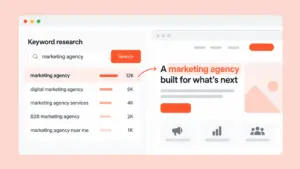
SEO includes using relevant keywords to help search engines discover and understand your content so customers can find it. Choosing suitable keywords and answering those searches well can improve your page’s visibility and help attract more clicks. Keyword research helps you understand what customers search for, the language they use, and the information they need.
Start by listing your main products, services, and the problems they solve. Use these as starting points for your research.
Google Keyword Planner provides keyword ideas and estimated search volumes. Its competition figures refer to advertising competition, rather than organic ranking difficulty.
Review the search results for your shortlisted phrases to understand which type of page fits. Product searches may need a category page, while questions may be better served by a guide.
For example, a furniture retailer targeting “dining tables for small apartments” could create a category page with suitable products, dimensions, and advice on leaving room for chairs.
Use the phrase naturally in the page title, heading, and content, then link to the page from related areas of your website.
Loop’s B2B SEO guide explains how to connect pages with different stages of a buying decision.may
2. Answer the Questions People Research Before Buying
Your website can attract customers through information as well as commercial pages.
Use enquiries, sales conversations, and support requests to build a list of recurring questions. Costs, comparisons, maintenance, suitability, and implementation are useful starting points.
Prioritize questions closely connected to your offer. A flooring company could explain which materials suit homes with pets, including durability, cleaning requirements, and tradeoffs between options.
Give the reader enough detail to make progress. Instead of describing every material as durable, explain where each performs well and where it may be unsuitable.
Bring in your team’s experience, photographs, and examples. Practical details from people who do the work can make your content more useful than another general overview of the topic.
Link to relevant products or services where they help the reader continue. This gives educational content a clear place within the website.
3. Create Useful Tools and Resources
Some customer needs are better served by a resource than an article.
A sizing guide, cost calculator, product selector, template, or checklist can give people a specific reason to visit your website and return to it.
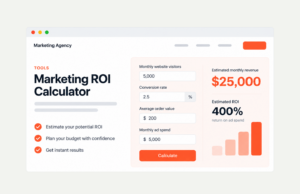
Start with a task customers regularly struggle with. A paint retailer could help people estimate how much paint a room needs. A software company could offer a planning template for the work its product supports.
You do not need to build a complex tool immediately. A clear measurement guide or downloadable worksheet may solve the problem well enough.
The benefit comes from making a useful task easier. A resource people use and share creates another route for potential customers to discover your business.
4. Make Your Website Easy to Explore
Organize navigation around familiar terms such as services, products, pricing, and resources. Visitors should be able to find what they need without learning your company’s internal terminology.
Start by reviewing your menus and identifying important pages that are difficult to reach. Group related pages under clear categories and remove labels that overlap or cause confusion.
Use internal links to connect information naturally. A guide about choosing flooring can lead to suitable product categories. A service page can lead to examples of completed work.
Write descriptive link text so readers know what they will find. “View our garden design projects” gives more context than “click here.”
Internal links also help search engines discover pages and understand their relationships. A useful guide can therefore support the visibility and discovery of related pages, while helping visitors explore your offer.
5. Turn Portfolios Into Case Studies
A portfolio shows the work you have completed. Adding case-study detail helps customers understand how you approached it and whether that experience applies to them.
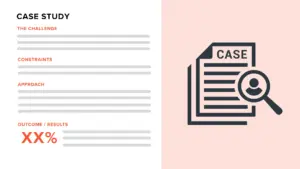
For each selected project, explain:
- The challenge: What the customer needed help with.
- The constraints: Budget, timing, space, technical requirements, or other limitations.
- Your approach: What you changed or adapted, and why.
- The outcome: What the work achieved, supported by available evidence.
For example, a company that makes custom canvases can share how they redesigned one of their existing frames to fit a property’s unique measurements. A case study like this can help customers see the problem-solving aspect of your business, giving them more insight into your services when researching a similar problem themselves. These case studies should include photographs as well as context on what was done to suit those requirements.
To show the outcome, include measured results where available or describe how the finished work addressed the customer’s needs. Organize case studies by service, industry, or challenge so visitors can easily find examples relevant to their own situation.
6. Use Website Tools to Find and Fix Problems
Website tools become valuable when you use their findings to decide what to improve.
Google Search Console shows the searches and pages associated with your website’s visibility in Google. Its performance report includes impressions, clicks, click-through rate, and average position.
Use it to investigate specific opportunities:
- A page appearing for relevant searches may need fuller information to answer them.
- A page receiving impressions but few clicks deserves a review of its position, title, and how well it matches the search.
- A useful page receiving little visibility may need stronger internal links or a check that it is indexed.
Search Console’s URL Inspection tool can help you investigate whether Google has indexed a particular page and identify relevant issues. Indexing is necessary for search visibility, but does not guarantee rankings.
For loading problems, run important pages through PageSpeed Insights. It assesses mobile and desktop performance and provides diagnostics to help identify improvements.
Use the findings to prioritize fixes, such as oversized images or unnecessary scripts, with your developer where needed. Test the page again after changes and check it on an actual phone.
Keep content maintenance in the same routine. Update outdated details, replace broken links, and improve established pages before assuming that more new content is the answer.
Where to Start
Choose one important service or product category. Research its related searches, improve the main page, and create supporting content around a few recurring customer questions.
Add a relevant case study, connect the pages with internal links, and use Search Console to review how their visibility develops.
This gives you a practical starting point: a useful set of pages that helps customers discover your business and understand what it can do for them.
Loop helps businesses improve website content, structure, and search visibility. If your website needs a clearer direction, talk to our team about where to focus.
Frequently Asked Questions
How can I attract more customers to my website?
Build pages that are relevant, useful, and credible. Support your content with useful guides, relevant case studies, and clear navigation. This gives customers a way to discover what your business does and explore what you can offer.
How do I choose keywords for my website?
Use keyword research tools. Explore trending and related searches to the industry relevant to your business. Review the results to understand what customers search for and choose terms that best fit your business.
Do I need a blog to attract customers?
Blogs are useful when it comes to customers researching questions you can answer well. However, providing detailed service pages, useful categories, resources, and case studies can also attract visitors to your site. You should prioritize content that best serves your customers needs.
Should I create new content or improve existing pages?
Review existing pages first. Update outdated information, fill important gaps, and fix technical issues. Create new content when it addresses a distinct customer need that your website does not already cover.
Comments are closed